About Me

My photo
Santa Clarita, Ca, United States
I work as a Technology Manager in the Entertainment Industry. My first film was Disney's Dinosaur and have been credited on several films since. I love working on old electronics, especially old radios. I am also passionate about technology and education. I have 4 kids and you can read about us on our family blog.

Friday, September 9, 2011

Apple Seminar: In-House Application Development for iPhone and iPad

I attended an Apple seminar in Irvine titled : "In-House Application Development for iPhone and iPad". It was a good high level overview discussing all things iPad/iPod/iPhone for the Enterprise. 

Agenda  (Also See Attached):
  1. Exploring Possibilities in the Enterprise
    • How are enterprise customers using mobile applications?
  2. Design Best Practices
    • What makes a great app?
  3. Getting Started with the Platform
    • Developer programs and training materials
  4. Development Overview
    • Web App Development Overview
    • HTML5/Javascript/CSS3 - What is  possible with web technologies?
    • Demonstration - Building a web app 
    • Native App Development Overview
    • Frameworks and integration options  available for native apps
    • Demonstration - Building a native app      
  5. Distribution and Deployment
    • Channels and methods for application distribution
Notes:
  • The class was given by Allen Braham of Apple. He flew in from New Jersey. Attendees came from as far away as Las Vegas.
  • Case Studies:  Links are to pages explaining the apps, not company links.
  • Deployment
    • You can deploy up to 100 devices through a developer license. If you need more, you need a enterprise license.
    • Each enterprise license has an single "Agent" who names "Admins". Admins can invite developers.
    • The Agent is the only person who can do distribution. The Agent must have legal ability to bind the company in a contract with Apple.
    • Admins or the Agent must approve development certificates.
    • All three positions, Developer, Admin, and Agent can be the same person if necessary.
    • Universal Apps:  One binary for both the iPhone and the iPad.
  • Design:
    • Allen stressed making sure you focus on functionality first. Don't try to cram your desktop app into an iPad. Instead, think about the essentials and do the minimum first.  Worry about graphics after you have a working app.
    • A successful IOS project will have more design than coding. Think about what your users are doign that can be mobilzed to make their life easier.
    • Emphasis is on "Bite Sized Apps", not large ones. "Many Bite Sized Apps make an entire meal".
    • A lot of $$$ is spent doing training. You want small, easy apps so training becomes trivial.
    • Do paper mockups. Mockups should not look too real. There are apps like "App Layout" or "iMockups" you can also look at.
    • It's important that things not be polished because folks won't give feedback on a digital prototype like they will with a paper based one. (I agree!)
    • One major pitfall is to make a screen a certain way because of aparticular API they are using.
    • Every app that is developed internally starts with a User Mental Model: Objects, Task, and Concepts.
      • Object: What are we working with . (Clendars, Days, Weeks, Appointments, Reminders)
      • Tasks: What are the things we need to do. (Scheduling, Create, Edit,    Search)
      • Concepts: What are the high level conceptual things. (Searhching, Search, Filter)
  • Development
    • Web:
    • Web apps can be done in HTML5, CSS3, and Java Script.
    • WebKit is    the engine behind Safari.  Google Chrome uses WebKit. Blackberry and    Android use it as well.
    • There is a 5MB limit to SQL lite for saving offline data which is useful in "Airplane Mode".
    • You can use "Configuration Profiles"  They are generated using the    iPhone configuration utility.
    • Web Clips are a "Chicklet"  which links to a web page. You get a safari window with an optionally    hidden broswer bar.
    • Dashcode : Used for making web apps. Use for iPad/iPhone as well.  (Demo)
    • Native:
    • Done in XCode.  (Demo)
    • Hybrid apps:
    • UI Web view within an app.  You can take advantage of    native applications.
    • You can exceed 5 MB of data storage.
  • Multitasking:Added iwth ios4.  Only allows certain things:
    • Voice over IP (Skype)
    • Location
    • Notification
    • Task Finishing
    • Fast App Switching.
    • Playing audio in the background.
  • Push Notifications. Push notifications are available in the    enterprise as well.  
    • Don't send sensitive information over alerts.
    • You can ship a custom sound for notifications.
    • Your server has to maintain the id # of the devices you are pushing    towards. You push a JSON payload to the apple cloud notificaiton    service.
    • Only the last message is delievered. If you miss the message,. you    will only get the latest.
    • Push Notifications and Local notifications are only available    through native apps.
  • Accessories: 
    • To build an accessory, you have to join the Made For iPod program.
    • Bluetooth Glucose meter.
    • Infinite Periferels Sled. Uses 30 pin connector.  Infinite Periferals gives you an SDK.
  • Location Based Services:
    • GPS takes more power than cel tower.
    • Think about Precision, Power, and TIme
  • Local Storage:
    • SQL lite. (Core Data)
    • Property Lists : an Apple Standard. They can be serialized or    de-serialized to/from data strucutres very quickly.
    • Parsing Speed for the same data: 
      • JSON 416ms
      • XML 812 ms
      • Ascii Property List 140ms
      • Binary Property List 19ms
  • App Security
    • Hardware Encryption: There is hardware encryption on the iPhone, iPad. etc. 
      • AES 256 bit encryption
      • Always on for all data.
      • Instantaneious remote wip
    • Data Protection: All data at rest is encrypted using hardware encryption.
    • There is no shared memory between applications.
    • To brick the system, you just have to throw away the encryption keys.

Thursday, September 8, 2011

Have You Discovered Minecraft?

Something happened last summer. My kids discovered Minecraft.


At first glance, it looks like a throwback to the early 1990's.  It's a very simple looking  game where players manipulate  blocks to build stuff. It's a sort of digital version of Legos.  However, for all it's apparent simplicity,  Minecraft is a wonderfully entertaining game to play, and a great outlet to express your creativity.


Besides just building, there is complex ability to create mechanical devices through something called Red Stone circuitry which is similar to wiring and circuits. There is also a complex array of things that can be built from raw materials through "Crafting". You collect simple raw resources, put them together, and make more complex things like dynamite for blowing through rock.

Another amazing thing about Minecraft is how it came to be.  It wasn't created by some big gaming company or some large studio. No, it was started by a single person with a passion for games. The person is Sweedish programmer Markus Persson.  He uses the alias "Notch" in many of his on line posting. Notch speaks about creating Minecraft on the minecraft web site. Here is a quote from his explanation.

"I realized that a game that simple yet that dynamic had a lot of potential to turn into a really great game, and kept coming up with things I wanted to change and stuff I wanted to add. I had recently quit my job as a game developer to be able to focus more on indie game dev during my free time, and I was looking for a new game to develop"

Not only is it an great game and a great story. It has generated a ton of money. At the time of this blog posting 3,379,564 users have put down the €14.95 to become a paying player That means Notch's little idie game experiment has generated over 50,000,000 Euros!

The game has also inspired songs and movies. For instance, here are some music videos that give some insight on what is inside the game. These also do a pretty good job of showing the basic concepts of the game and screen shots of what you'll see.


Not only are my kids playing the game, but they are singing the songs as well. This one gets a lot of play in my house as well. It's a parody of a Tiao Cruz song. Instead of "Dynamite", it's "TNT". Ben says "TNT is fun when you hook it to red stone and make TNT cannons".


Of course, what game is complete without a Lady Gaga Parody.


Feel like you are missing out on a whole event that was happening without you knowing it? How about this, a Minecraft Movie. I actually find this one especially entertaining. The movie has quite a bit more blood and carnage than you'll see in the game though.

Wednesday, August 31, 2011

Disney Toon Studios

I was fortunate enough to get invited for a lunch trip to Disney Toon Studios in Glendale, Ca. This was a chance to visit friends and see their new building.  It's really a neat campus.  I was told that the large atrium area was designed by Allied Works Architecture which is the same firm that designed the new building for Pixar Animation studios. I got to visit Pixar while up in San Francisco for WWDC 2010 and really enjoyed seeing their facility as well. Both sites are great facilities with wonderful open spaces.

When you first walk in, you see a large open area. 


The nice thing about a space like this is it makes folks cross paths.  I find that meetings in the hallway tend to be my most productive ones. When meeting in the hallway, you are talking because you have something you really need to talk about, and the meeting ends on time because everyone is standing.


The open area has a Pool Table, Video Games, and Cereal Bar.  These things do a great job of drawing folks into the common area.

Conference rooms are adjacent to the common area as well.

The wood is beautiful.

There is a nice outdoor garden area and lunch tables as well.


Tuesday, August 30, 2011

Tuesdays With TED

Every Tuesday morning, the faculty and staff at SCVi Charter school, gather together to watch a TED Talk.  After the talk we discuss what we learned and how it is relevant to our lives and work. This blog posting is meant to be a running tally of the talks we have reviewed. It will consistently be edited as we watch more.

DateTalk Comments
August 30, 2011 Dan Pink On The Surprising Science Of Motivation Facilitated by Amber Raskin. My favorite TED talk.  A great way to start the 2011/2012 school year.
Sept 06, 2011Johnny Lee Demos Wii Remote HacksFacilitated by Matt Schnittker. Wii Remotes installed in classrooms Summer 2011. We plan to use this system in our school.
Sept 13, 2011 Sam Chaltain - The Freedom To LearnFacilitated by Dawn Evenson.
Sept 20, 2011 Matt Cutts: Try something new for 30 daysFacilitated by Amber Raskin. Folks had the opportunity to commit to something for 30 days.
Sept 27, 2011 Sunni Brown: Doodlers, unite!Facilitated by Mrs. E. Great chance to talk about when we have doodled and when we were scolded for it.
Oct 04, 2011 Richard St. John's 8 secrets of success Facilitated by Allison O'Hare
Oct 11, 2011 Discussion This week was used just to discuss projects being done at the school.
Oct 18, 2011 Julian Treasure: 5 ways to listen better Facilitated by Katie Peterson
Oct 25, 2011 Steve Jobs Stanford Commencement Facilitated by Amber Raskin
Nov 1, 2011 Geoff Mulgan: A short intro to the Studio School Facilitated by Jim Mulholland
Nov 8, 2011 Tim Brown on creativity and play Facilitated by K/1 Facilitators
Nov 15, 2011 Kiran Bir Sethi teaches kids to take charge Facilitated by Ana Donovan
Nov 29, 2011 Facilitated by Team 8
Dec 6, 2011 David Blaine : How I held my breath for 17 minutes. Facilitated By Christy Zimmerman
Dec 13, 2011 Tod Machover and Dan Ellsey play with music Facilitated By Jodie Kirby
Jan 10, 2012 Sarah Kay: If I should have a daughter Facilitated By Dawn Evenson
Jan 17, 2012 Joe Sabia: The technology of storytelling Faclilitated By Shannon Barragan
Jan 24, 2012 Hiring Bonanza - No TED
Jan 31, 2012 John Bohannon: Dance vs. Powerpoint, a modest proposal  Facilitated by Shelby Curtis
Feb 07, 2012 TEDx Orange Cost - Matthew Peterson: Teaching without words.
Feb 14, 2012 Diana Laufenberg: How to learn? From mistakes Facilitated By K/1
Feb 21, 2012 Adora Svitak : What adults can learn from kids.
Feb 28, 2012 Raghava KK: Shake up your story. Kathy Reynar
Mar 06, 2012 Simon Sinek: How great leaders inspire action 2n'd Grade Team
Mar 12, 2012 Drew Dudley : Everyday Leaders 3'rd Grade Team
Mar 20, 2012 TBD Team Explorers
Mar 27, 2012 Susan Cain : The power of introverts Malaka Donovan
Apr 03, 2012 Spring Break Spring Break
Apr 10, 2012 Mick Mountz  : The hidden world of box packaging Dustin And Keith
Apr 17, 2012 TBD TBD
Apr 24, 2012 TBD TBD

Thursday, August 25, 2011

SCVi Summer 2011 Wireless Project

Overview Of The Project

Wireless devices are now an important part of the learning environment. Students make use of laptop computers, iPods, iPads, and  Netbooks in their learning at our school. In summer 2011, we decided to increase our wireless usage by adding 30 school owned iPads and about 70 new Netbooks.  We also greatly increased the number of school-issued teacher and staff laptop computers and increased our school enrollment from around 500 to over 750.  This warranted a substantial improvement in our wireless network.

What We Started With

For the first three years of Operation, SCVi had a total of 4 wireless access points. These were located throughout the building, but the largest concentration was upstairs in the south wing. This document shows these as "Old AP" and are represented by the blue circles. It also shows some places we were considering adding new AP's for a more optimal coverage and these are marked as Meraki AP's because that is the first vendor we looked at. 


All access points were Cisco Aironet 1200's which we felt could service about 20 users each before we started to see significant performance issues.  With this many access points, we could service about 80 simultaneous users, which meant the school wireless network would come to a crawl by mid morning.

Wireless Research

We started investigating vendors for our wireless upgrade. We knew we wanted to go to Wireless N technology which would give our access points greater speed, greater range, and more concurrent users. We started looking at different vendors. The following table shows some of the vendors we talked with.

Vendor
Option
Hardware Included
Recurring
Cost ( per year)
Notable Features
Meraki / IMT
New Access Points Only
Meraki MR16 Cloud Managed AP
Mandatory Fee For Cloud Controller Access. Pay per AP.
  • Cloud controller ONLY.
  • Cloud controller has an annual fee per access point
  • Great features on the cloud controller and overall very polished product.  Would be nice for multiple sites.
Meraki / IMT
New Access Points + New Router
Mandatory Fee For Cloud Controller Access. Pay per AP. + License Fee for Router.
  • Router has two inputs and automatic failover.
  • Router will not act as the controller, you still need to pay for a cloud controller.
Aerohive / Altaware
New Access Points Only

Aerohive AP-120
Mandatory Fee For Cloud Controller Access. Pay per AP.
  • Cloud controler.
  • Cloud controller has an annual fee per access point, but fee is less than Meraki. 
  • You can buy a controller for in-house control, but is very expensive.
Blue Socket / Intuitive Networks
New Access Points Only
Optional Support Only.
  • Controller is in-house. No cloud needed. 
  • Was the only vendor that provided us with a Demo access point. This was very nice. 
  • We were able to get a single access point up and running using their cloud controller without too much trouble.
Blue Socket /CDW
New Access Points Only
Blue Socket 1800 Access Points
Optional Support

Aruba / CDW
New Access Points Only

Aruba AP-15 Acces Points
Optional Support
Aruba / CDW
New Access Points + Aruba
Controller
Optional Support
  • Controller required for more than 16 ap's. Could buy controller later.
  • I like their tutorial videos
  • If using the controller, you can no longer use Aruba Instant so you have to pay $100 per AP licensing fee.
DLink /
110 Technology
New Access Points Only
DLink DAP2553
-
  • Cheapest possible solution and still a huge upgrade from what we have now.
DLink /
110 Technology
New Access Points Only
DLink DAP2590
-
  • Plenum rated version of the DAP2553. Put above ceiling.
DLink /
110 Technology
New Access Points Only
Dlink DAP 2555
Mandatory Fee For Cloud Controller Access. Pay per AP.
  • This is DLink's Cloud solution Cloud based solution. Fee is $100 per access point.
  • If we want cloud controlled, this is the cheapest.
DLink / Computer1
New Access Points + Controller
Optional Warranty
  • Most robust hardware solution. Scales to 64 access points.
  • Includes a 24 port switch - Nice.
  • Best overall value of Hardware for $$

We decided to go with Aruba for these reasons:
  • The solution scales nicely. You can start with Aruba Instant, then go to Aruba with a controller or cloud based as you get larger.
  • Good tutorials and videos on web site.
  • Software looks polished and is easy to use. 
  • We got a really good quote. 

Implementing The Access Points

Our old access points had three separate SSID's.  Each had different routing to different VLAN's.  All three were open, but only one broadcast the SSID.  Here is an overview of the config from one of our Cisco access points.


Each of the access points is routed to a separate network with different filtering in Open DNS. This allows us to filter the content for teachers separately than the content from the student population.  Since the SSID's of the old access points were not very descriptive, we decided to change them.


Old SSIDs Security New SSIDs New SecurityVLAN Purpose IP Domain Internet Supplier
Stars Open SCVi-Learner Open Student usage 172.168.128.xx, 172.168.129.xx Fireline Broadband 10Mbit
Ambassadors Open - Hidden SSID SCVi-Facilitator WPA2 - Password Protected Teacher, Admin, and Staff usage 172.168.12.xx Telepacific 10Mbit
guru Open - Hidden SSID SCVi-Admin WPA2- Password Protected Network Administration by IT Staff 192.168.250.xx Telepacific 10Mbit

When the Aruba access points arrived, we started setting them up.  Configuration is pretty easy. You plug in the first access point and connect to it with a computer. You then navigate a web browser to http://instant.arubnetworks.com and use a web page to configure the device. Here is how the network configuration for the above SSIDs looked in the Aruba software.


The Learning Really Begins

As soon as we plugged in the access point, it became evident that our old Cisco Catalyst 3550 was not going to be able to power the new Aruba AP's. The AP's would cycle on and off but never started up. For the first AP, we simply constructed a external power supply to get started and worked with it plugged into the 3550. This worked for one AP, but this was not going to work for the rest of the network.

In order to power the new AP's properly, we purchased a DLink DGS-3100-40 managed POE switch.  This powered the AP's nicely, but after a few days of trying to get it to work, we realized the configuration was going to take some learning.  We needed to get the VLAN's used by the AP's to properly propagate through the new switch.  Otherwise, we could only get them working on the administration network.  It was time to call in some help!

We were able to get some expertise from Earl Rolley who helped design our original network.  He helped work out a lot of our configuration problems with our Cisco equipment. However, after plenty if tinkering, we still were not able to get the DLink switch up and running. So, we are running off the old switch and using POE Power injectors.  Still, we have learned a lot. Some highlights of the config are as follows.
  • We replicated all of the VLAN's from the cisco hardware on the DLink switch and configured it to tag the ports for these VLAN's.
  • Any switch on the Cisco hardware that fed the Dlink Switch or an Access Point must be set to mode "trunk".  (See cisco commands below.)
  • The drop to POE#3 Kindergarten had significant configuration problems that I simply didn't understand. Earl figured them out and set things correctly. 
  • What Cisco calls "Trunking" and DLink calls "Trunking" are totally different things. When Cisco configures a port to "Trunk" that means it's meant to feed another switch. However, in DLink, it is port aggregation. 
  • We enabled Spanning Trees on the DLink switch, but still not sure if that was the right thing to do. 
  • Since we use VLAN 250 as our admin VLAN; To talk to the Dlink switch as an admin plugged into a port, configure all the VLANs to be off except 250.
Understanding Switch Ports and VLANs
Virtual LANs allow different ports on a switch to be configured to talk to different networks. Our old access points were plugged into ports 1-4 on POE switch #2.  We actually were set up to talk to them on 8 total ports. This document shows how things are configured. For the new DLink switch, we plugged it into the Gigabit Ethernet port on SW1 and configured the port to trunk.


    Learned Some Cisco Commands

    There were several cisco commands I learned while configuring the switches. These commands can be performed by logging into the switch using telnet or ssh.

    Command TypeWhat it does
    show vlan Read Shows the VLAN's configured on the device
    show run Read Shows the entire switch config as currently running
    show ip dhcp server Read
    show ip dhcp server statistics Read
    show interfaces Read show the interfaces on the device
    show version Read shows software version, but more importantly, shows Uptime
    show power inline Read shows POE status on POE switches/td>
    show interface status Read show status of each interface.
    show startup-config Read
    show cdp neighbor Read Show who is connected to a port. (Handy!) Must be in switchport mode.
    show run interface fastethernet 0/1 Read
    show run interface fa 0/46 Read Notice that you can abbreviate the word fastethernet
    show run interface gig 0/1 Read
    config - Puts you into configuration mode so you can change settings.
    interface fastethernet 0/6 -
    switchport access vlan 250 Write Adds the port to VLAN 250
    no switchport access vlan 128 Write Removes VLAN 128 from a port
    switchport mode access Write Tells a port to auto-detect for Trunk or VLAN mode.
    switchport mode trunk Write Change the switchport to TRUNK mode
    switchport trunk encapsulation dot1q Write Change port mode to 802.1q (Allows TRUNK mode)
    do show run interface fastEthernet 0/48 Read When in config mode, you can use "do" to run the regular Read commands
    write Write Set's the configuration to be saved for next time the switch reboots

    Using the above comamnds, we were able to learn some really useful things. For instance to see what VLANs are available on a particular port, you can use the "show vlan" command.


    SCVI-POE-SW2#show vlan
    VLAN Name                             Status    Ports
    ---- -------------------------------- --------- -------------------------------
    1    default                          active    
    2    gateway_network                  active    
    4    VLAN0004                         active    
    12   VLAN0012                         active    
    20   network_printers                 active    
    30   teacher_network                  active    
    40   student_network                  active    
    50   VoIP_phone_network               active    Fa0/9, Fa0/10, Fa0/11, Fa0/12, Fa0/13, Fa0/14, Fa0/15, Fa0/16
                                                    Fa0/17, Fa0/18, Fa0/19, Fa0/20, Fa0/21, Fa0/22, Fa0/23, Fa0/24
    60   office_administration_network    active    
    128  VLAN0128                         active    
    250  network_administration_network   active    Fa0/5, Fa0/6, Fa0/7, Fa0/8, Fa0/9, Fa0/10, Fa0/11, Fa0/12, Fa0/13, Fa0/14
                                                    Fa0/15, Fa0/16, Fa0/17, Fa0/18, Fa0/19, Fa0/20, Fa0/21, Fa0/22 Fa0/23, Fa0/24


    This is the typical config for a "Trunk" port on the cisco switch. i.e. Ports that power either an Access Point, or a Phone. (The phones are a Trunk device)

    description NetworkAdministration
    switchport access vlan 250
    switchport trunk encapsulation dot1q
    switchport trunk native vlan 250
    switchport mode trunk
    switchport voice vlan 50
    mls qos trust dscp
    priority-queue out
    spanning-tree portfast
    
    Here is a config from the "Student" ports on the POE switch that feeds high school.

    switchport access vlan 128
     switchport mode access
     switchport voice vlan 50
     power inline never
     spanning-tree portfast
    

    Network Overview - For Technical Parents

    Since our school relies heavily on parent volunteers, We have documented our entire network here.  This is to help future parents understand how we are configured.


    Wednesday, August 17, 2011

    iPad Resources

    Our school has decided to buy iPads for student use. This was a big decision in many ways because we want to make sure they are actually used for educational purposes instead of as a easy way to sneak an update to your facebook status. (although we block facebook right now).  Here are some links that were being passed around as we did our research.

      Saturday, April 9, 2011

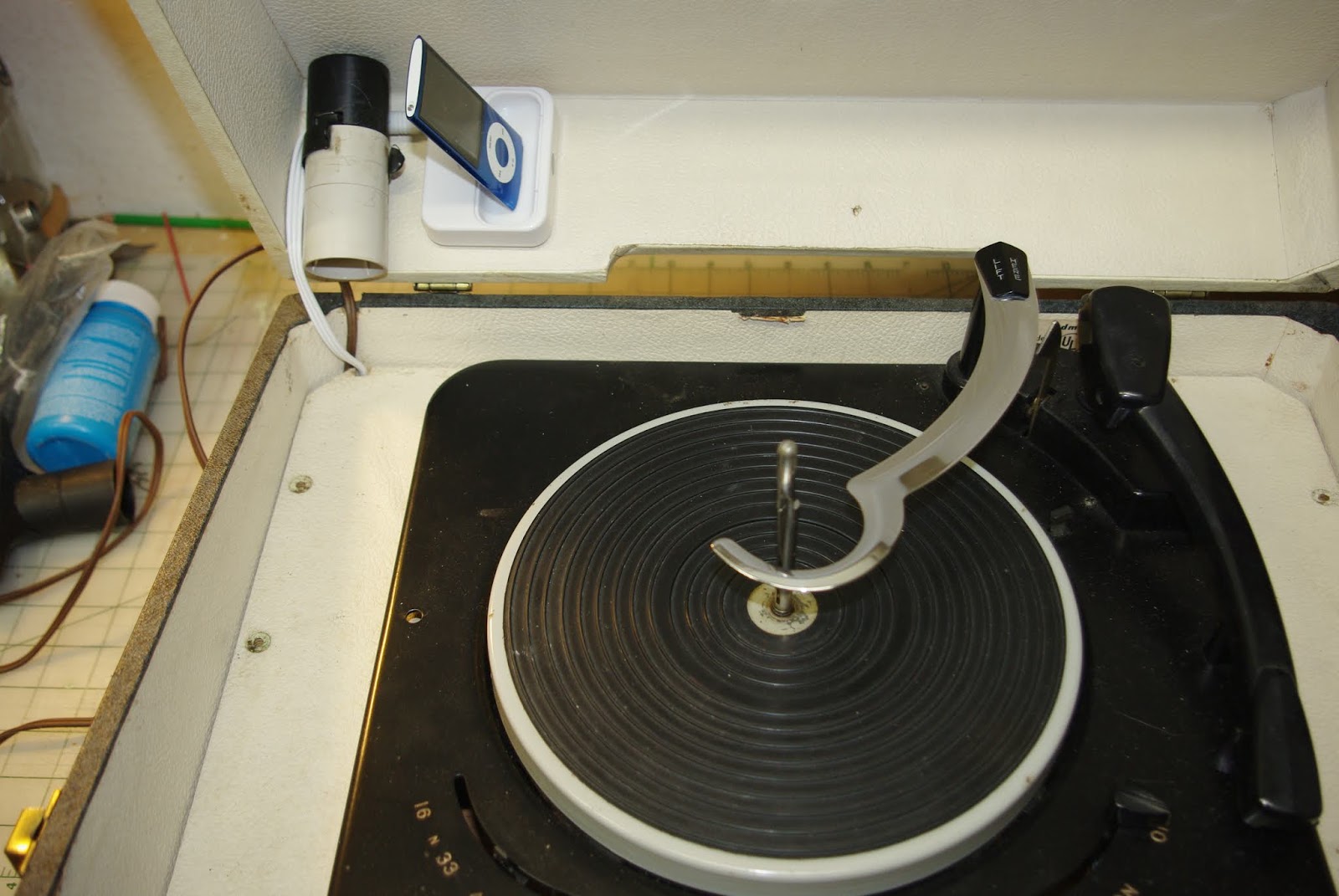
      Admiral 601 Turntable iPod Dock

      I had an Admiral turntable that I thought might make a nice iPod dock. 


      As usual, the older electrolytic capacitors were bad so I had to replace them with modern ones. 


      I then added the iPod Dock. 


      Testing out  the audio.


       New capacitors soldered in, getting things put back together.


      Added a switch to power on the tube amp without turning on the turntable motor.


      The final install.